Video Generation

AI tools for creating, editing, and enhancing videos from text or images

All

Video Generation

38 listings
Vidu

Vidu

Vidu is an AI video generator that turns text, images, and visual references into video clips, targeting independent creators, animation teams, and marketing teams. The platform emphasizes character consistency, fast generation speed, and flexible creative control. Vidu offers three main creation modes. Text-to-video generates clips from a written prompt alone. Image-to-video animates a static image, with the option to set first and last frames for more directed results. Reference-to-video โ€” the mode users cite most often โ€” accepts three or more reference images of a character, object, or scene and blends them into a single coherent video, with multi-angle uploads supported to keep characters consistent. A My References library lets creators save characters, props, and scenes for reuse across projects. Outputs range from low resolution up to 1080p, and the platform includes a storyboard feature, a Vidu App for collaborative creation on the go, and Vidu Agent, an assistant-style workflow that develops a single sentence into a finished piece. Vidu is widely used for social content such as viral kissing, hugging, or fighting clips, for studio-level 2D animation and anime-style work, and for commercial advertising where marketers animate product images or swap ad backgrounds. Every user receives free credits to try the platform, with individual and enterprise plans available for heavier production. The site also maintains a Discord community and help center for support. Vidu fits creators who care about keeping characters and scenes consistent across many generations โ€” especially anime, character-driven shorts, and ad variants โ€” and who want reference-driven control rather than pure prompt luck.

Stable Video Diffusion

Stable Video Diffusion

Stable Video Diffusion is Stability AI's generative model for producing video from the Stable Diffusion family. The model turns a text prompt into video output, and Stability AI positions it as video generation that teams can run where they already work โ€” including on their own infrastructure through a self-hosted license aimed at environments that need advanced customization. On the technical side, the model generates clips of 14 and 25 frames with customizable frame rates between 3 and 30 frames per second, and the company states that videos are created in two minutes or less. Because it is based on the Stable Diffusion lineage, it carries that ecosystem's emphasis on open, deployable models rather than black-box APIs: the self-hosted license lets organizations deploy the models in their own environments and tune them to their needs. Stable Video Diffusion suits developers, creative teams, and enterprises that want generative video capabilities but prefer control over where models run and how they are customized, rather than depending entirely on hosted services. Because the model descends from the Stable Diffusion lineage, teams already familiar with that ecosystem can adapt existing tooling and knowledge, and the self-hosted option supports deeper customization for specialized pipelines such as branded content or internal prototyping. Media teams exploring AI-assisted motion graphics, prototyping teams iterating on video concepts, and researchers extending open video models are natural fits. Licensing details for the self-hosted tier are handled through Stability AI directly. For teams comparing AI video generators, Stable Video Diffusion is the open-weights option in Stability AI's lineup โ€” valued for deployment flexibility more than raw clip length.

Mochi 1

Mochi 1

Mochi 1 is an open-source text-to-video model developed by the research lab Genmo, released under the permissive Apache 2.0 license for personal and commercial use. It is a 10-billion-parameter diffusion model built on a novel Asymmetric Diffusion Transformer architecture, trained entirely from scratch โ€” described at release as the largest openly released video generative model. The preview generates clips at 480p resolution and 30 frames per second, up to 5.4 seconds long, with two recognized strengths: motion quality and prompt adherence. Genmo and reviewers highlight its fluid, physically plausible motion โ€” the model handles phenomena such as fluid dynamics, hair and fur movement, natural human motion, and realistic camera moves โ€” along with precision in following detailed text prompts, which matters for creators who write careful descriptions of action and camera work. Genmo also open-sourced the model's video VAE, which compresses video dramatically to cut memory and compute demands. Developers can download the weights from Hugging Face, find the source on GitHub, and run the model locally or through ComfyUI workflows, with fine-tuning permitted. Creators who do not want to run GPUs can try generation in Genmo's hosted browser playground, which operates on a credit system per video. Mochi 1 suits researchers, developers, and tinkerers who want a hackable, transparent video model they can inspect, modify, and build on, as well as creators prototyping scenes. Its limits are modest resolution and short clips compared with closed commercial tools, but its openness and motion fidelity keep it relevant in the open video-model ecosystem.

CogVideoX

CogVideoX

CogVideoX is a family of open-source AI video generation models from Zhipu AI's THUDM group, covering text-to-video, image-to-video, and video continuation. Published on GitHub under a permissive license, it is aimed at developers, researchers, and hobbyists who want to run serious video generation on their own hardware rather than through a paid API. The lineup spans several sizes. CogVideoX-2B is the lightweight option: with the diffusers library and memory optimizations it can run on older cards such as a GTX 1080 Ti, needing as little as 4 GB of VRAM in quantized mode, and its weights were released under the Apache 2.0 license. CogVideoX-5B targets desktop GPUs like the RTX 3060 and produces higher-quality six-second clips at 720 by 480. The newer CogVideoX1.5 series raises the bar to ten-second videos at up to 1360 by 768, with the image-to-video variant supporting arbitrary resolutions. Inference is supported through both the diffusers library and the team's SAT framework, with quantized INT8 and FP8 paths for memory-efficient generation, and the CogKit toolkit plus LoRA support make fine-tuning practical on a single high-end consumer GPU. Because the models were trained on long, detailed prompts, the project ships prompt-optimization guidance, using a capable language model to expand short prompts, which materially affects output quality. Everything, from weights to training code, is public, and free community demos exist on Hugging Face Spaces. CogVideoX is a strong fit for builders who want transparent, self-hosted AI video generation and the freedom to fine-tune models for their own styles and use cases.

Haiper 2.0

Haiper 2.0

Haiper is an AI video generation platform developed by Haiper, an AI research and product company based in King's Cross, London. It lets creators make short video clips from text descriptions or by animating still images, with no video editing skills or specialized software required. The web app covers text-to-video generation, where users describe the scene, subjects, and movement they want; image-to-video generation that brings uploaded stills to life with motion; and a templates library for quick starts in popular styles. Independent reviews note additional creative controls such as video repainting for adjusting colors and textures within scenes, camera controls for pan, zoom, and tilt, and dynamic pose and lighting adjustments, with most videos rendering in a matter of minutes. Output is aimed primarily at social platforms โ€” TikTok, Instagram, YouTube Shorts โ€” as well as presentations, ads, and creative portfolios. The company was founded by researchers formerly at DeepMind and Google, according to those reviews. Haiper's site describes a community-driven approach, encouraging creators to experiment and give feedback as the company's perceptual foundation model evolves, with a creator program announced as coming soon. The site itself publishes little detail on current plans or pricing, and independent reviews differ on whether access is currently free or credit-based, which suggests terms have changed as the product matured. Haiper also offers a public API with per-second and per-image pricing for text-to-video and image generation, aimed at developers integrating generation into their own products. Before committing to a workflow, creators should check the current credit costs and plan terms on haiper.ai. Haiper suits hobbyists and social creators who want a fast, low-friction way to produce AI video without a paid stack.

Helios

Helios

Helios is an open-weight AI video generation model built for real-time, long-form video. Developed by the PKU-YuanGroup research project, it is a 14-billion-parameter autoregressive diffusion model that generates minute-scale, high-quality video at 19.5 frames per second on a single NVIDIA H100 GPU โ€” roughly 10 frames per second on an Ascend NPU โ€” without relying on the usual acceleration tricks such as KV caching, quantization, or sparse attention. The model's architecture uses a unified input representation that natively supports text-to-video, image-to-video, and video-to-video tasks. A key design focus is robustness against long-video drift: the training explicitly simulates the drift failures that make long generations degrade, so Helios holds coherence and motion variety across clips of a minute or more instead of collapsing into repetitive loops. Infrastructure-level optimizations also cut memory use, letting training run without parallelism frameworks at batch sizes comparable to image models, with up to four 14B models fitting in 80 GB of GPU memory. The researchers released the code, base model, and distilled model publicly โ€” the project's GitHub repository (github.com/PKU-YuanGroup/Helios) documents highlights, video demos, and example prompts, and the method is described in the arXiv paper 2603.04379. Helios suits developers building interactive video applications such as real-time content creation tools, magic-mirror-style experiences, and accessibility products, as well as filmmakers who want fast previs or storyboard animation and can iterate in minutes rather than overnight. Note that the helios.video domain is currently parked and listed for sale, so it does not lead to the model; the GitHub project page is the working reference.

LTX 2.3

LTX 2.3

LTX Studio is a web-based AI video production platform from LTX that carries a project from concept to final cut. It is aimed at filmmakers, advertisers, and creative teams who want professional-grade generative video with more control than a simple prompt box. Generation starts in a dedicated workspace: users create production-ready clips from text prompts, image references, or a mix of both, with text-to-video, image-to-video, video-to-video, and audio-to-video modes. Beyond generation, the platform offers shot-level direction tools โ€” camera movement controls, motion keyframes, and visual reference guidance โ€” plus preset visual styles ranging from cinematic to sketch to branded looks for faster iteration and a consistent aesthetic. A distinguishing feature is its Elements system: AI-defined characters, objects, locations, and other components that maintain visual consistency across scenes throughout a project, addressing one of the hardest problems in AI video. The platform also covers pre-production tasks like scripting and storyboarding and continues through editing and delivery, all without downloads since it runs entirely in a desktop browser. LTX Studio offers free and paid plans: the free tier covers basic creation, while paid plans add premium tools, faster generation, and more compute time, with monthly and annual options detailed on the pricing page. Separately, LTX-2, the company's multimodal AI model, is fully open source with public weights and training framework. The platform fits creative professionals and serious creators building ads, films, stories, and visual assets with AI. The platform is built for real production workflows, with LTX describing its model infrastructure as multimodal and professional-grade. Because it is fully web-based, teams can collaborate on projects without local installs, and the company emphasizes continuous innovation and a secure, high-performance environment for professional users.

Luma Dream Machine

Luma Dream Machine

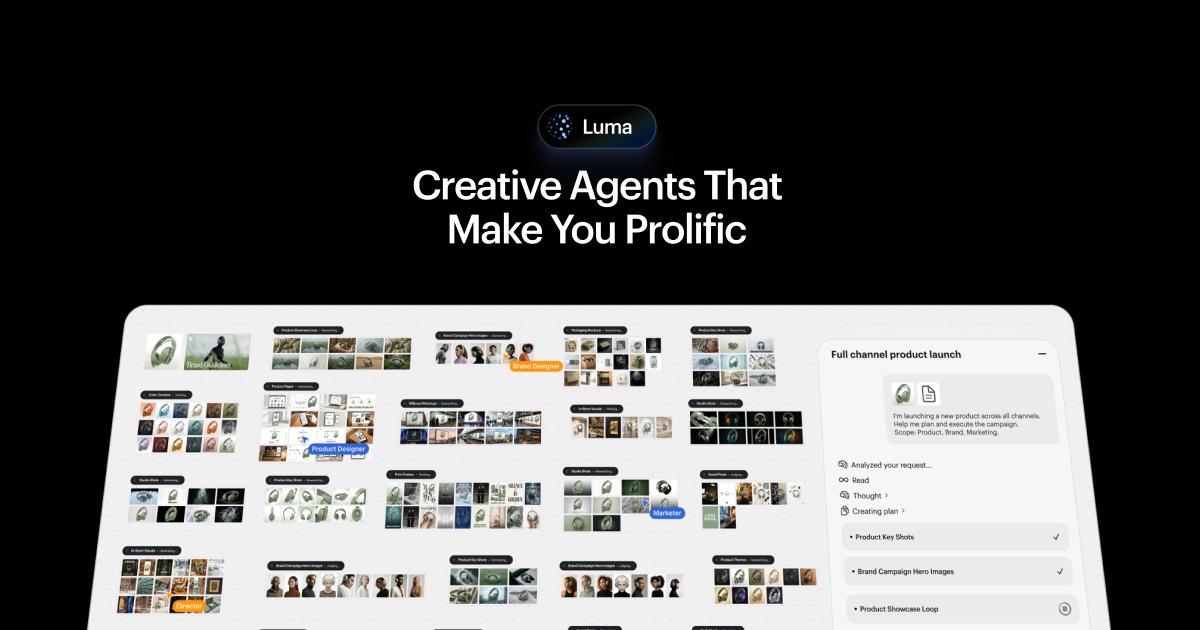
Luma is an AI creative platform from Luma Labs that combines image, video, audio, and text generation in one agent-driven workspace aimed at creative professionals and marketing teams. The page that once hosted the Dream Machine video generator now presents Luma Agents: you describe what you want on an infinite canvas, and the Luma Agent plans, picks the right models, generates, refines, and scales the work, or you can drive the tools directly for finer control. The platform offers access to Luma's own frontier models: Ray 3.2 for frame-by-frame cinematic control, continuity, and motion transfer, and Uni-1.1, which follows complex instructions and preserves brand references, alongside third-party models including Seedance, Kling, Veo, and MiniMax, so you are not locked into a single engine. Two modes structure the workflow: Brainstorm Mode for thinking through ideas without generating media, and Create Mode for production. Editing is covered end to end: modify images, animate stills into video, extend clips, reframe aspect ratios, add voiceovers, music, captions, and lip sync, and keep characters, products, and logos consistent across variations with Master Reference Assets. Connectors tie Luma into existing pipelines such as Figma, Frame.io, Google Ads, and cloud storage. Luma fits agencies, content teams, and filmmakers who need to move from one idea to many deliverables, such as campaigns, social content, and product launches, without switching tools. Pricing is credit-based and published on the site: Plus at $30 a month with 10,000 credits, Pro at $90 a month with 40,000, and Ultra at $300 a month with 150,000, with business plans adding team management, shared credits, usage analytics, and SSO. A fitting pick for teams that want creative scale at speed.

Kling Video 3.0

Kling Video 3.0

Kling is an AI video and image generation platform from Kling AI that turns text prompts, still images, and visual references into video and image content within a single studio. It is aimed at creators, studios, and brands producing social content, advertising, and longer-form AI-generated media. The platform supports image-to-video workflows in which a reference image is animated with minimal or no prompting, text-to-video generation, and storyboard-style planning โ€” including the ability to predict subsequent scenes from a single frame and generate multiple storyboards from it. A Canvas workspace lets users brainstorm with an agent, write scripts, and generate images, videos, and storyboards, then iterate through multiple rounds of post-production within one project. Kling also offers Kling Image 3.0 for high-detail still generation with cinematic color grading, film-style grain, and precise camera and lighting direction in prompts. Industry applications highlighted on the site include e-commerce fashion (on-model showcases and product videos from product or model images), beverage and FMCG advertising, consumer electronics product demos, and in-car displays such as center consoles and head-up displays. The platform's work has appeared in commercial productions โ€” from a Longchamp collaboration with studio Obsidian to award-winning AI-generated ads and even a feature film with all visuals generated by Kling. Resolution, clip length, and plan options are listed inside the app rather than on the marketing pages, so creators should check the studio for current limits. Kling fits creators and production teams that want a single environment for ideation, generation, and finishing of AI video work.

Higgsfield

Higgsfield

Higgsfield is an AI-native creative suite for generating and manipulating images and video. Its flagship offering centers on its Genjutsu tooling, which treats video as something to be manipulated rather than just generated: users can transfer motion from one clip into entirely new scenes, or swap specific objects and details while everything else in the shot stays as filmed. A Genjutsu API exposes motion transfer and object swap through a single API call for developers building these effects into their own products. For generation, the platform offers models such as Wan 3.0 Unlimited, which creates up to 30-second videos from text, image, video, or audio inputs, and Seedance 2.5, described on the site as the platform's most advanced AI video model. A Katana feature turns ordinary clips into polished edits with a single command, while Ads Studio with Ad Multiplier lets advertisers recreate existing ads using their own products and characters โ€” a direct fit for performance marketing teams testing creative variations. Higgsfield also emphasizes project transparency: creators can explore inside any project to see the prompts and assets behind it, which makes it easier to learn techniques from finished work and reproduce successful styles across campaigns. The suite targets content creators, social video producers, advertisers, and teams that need fast visual output with control over motion and identity. Pricing details are handled on the Higgsfield site rather than shown on the homepage. For teams weighing an AI video generator, Higgsfield's motion-transfer and ad-recreation capabilities make it worth comparing against generation-only tools.

Pika 2.5

Pika 2.5

Pika is an AI creative platform that brings video, image, and sound generation into a single workspace for creative professionals. Rather than a single model, Pika positions itself as a hub: leading generative media models underneath, with focused creative apps on top, aimed at people producing client-ready work such as ads, short films, and branded content. The platform's core capability is AI video generation, with tools for animation and character work alongside newer audio features. Pika Soundtrack, introduced in August 2026, turns a video into a synchronized, full-scene soundscape โ€” motion-aware sound effects, voice, music, and ambience that follow the on-screen action โ€” so creators can produce sound design alongside their visuals. A September 2026 relaunch consolidated video, image, and sound creation into one product. Pika's site showcases a community gallery of work made with its tools, alongside a research section where the team publishes its methods and findings. It also runs a Pika API club aimed at developers and studios building production applications on its models, with member pricing for API use. Pika suits video creators, animators, marketers, and studios that want an integrated creative stack rather than stitching together separate image, video, and audio tools. Its pitch is completeness and simplicity: multiple model options in one place, with outputs meant to meet professional standards. The company describes its audience as industry professionals who share high standards for creative work, and it maintains a research publication arm alongside the product. Detailed feature lists and pricing, including API member pricing, are listed on Pika's site; specific plan prices were not shown on the pages reviewed.

AI video-generation tools can support text-to-video, image-to-video, avatars, editing, localization, and other creative workflows. Use this directory to compare products by their stated workflow, then verify current capabilities and terms on each linked official source.

How to evaluate video-generation tools

  • Define the output first: short generative clips, editing, avatar-led explainers, localization, or an API workflow.
  • Test representative prompts and source assets, then review motion, consistency, controls, export behavior, and human review needs.
  • Check rights, privacy, retention, integrations, model or training policies, and plan terms before adopting a tool.

This category is an organized starting point, not a ranking or endorsement. Product details and availability can change, so review the official source linked from each listing. For the current Sora transition timeline, see the Sora transition guide and the linked OpenAI source.